主题
0. 方案总览
1. 要解决什么问题?
tRPC-Agent 在运行 LLM Agent 时,内部会经历多轮 LLM 调用、Tool 执行、子 Agent 转移等步骤。业务需要:
- Tracing:在 Langfuse 中可视化完整执行树,定位哪次 LLM / Tool 出错
- Prompt Management:从 Langfuse 拉取 Instruction,并关联到 Generation
- Evals:基于 Trace 数据做评测(Langfuse 平台能力)
难点:Agent 框架本身不自带可观测后端。
tRPC-Agent 的思路:复用 OpenTelemetry 标准,在框架关键路径埋点;Langfuse 已支持 OTel 接入,只需做 属性映射 + OTLP 导出。
2. 生活类比:工厂流水线 + 标准面单
| 真实世界 | tRPC-Agent 方案 |
|---|---|
| 工厂各工位(Runner / Agent / LLM / Tool) | 框架执行链路 |
| 工位记录生产日志(Span + Attributes) | trace_runner() / trace_call_llm() 等 |
| 统一面单格式(OpenTelemetry) | gen_ai.* + trpc.python.agent.* 属性 |
| 快递公司分拣规则(Langfuse 映射) | _LangfuseMixin._map_attributes_to_langfuse() |
| 收货仓库(Langfuse Server) | POST /api/public/otel/v1/traces |
核心原则:在框架内部埋点,走 OTel 标准通道上报,而非旁路解析日志文件。
3. 端到端数据流
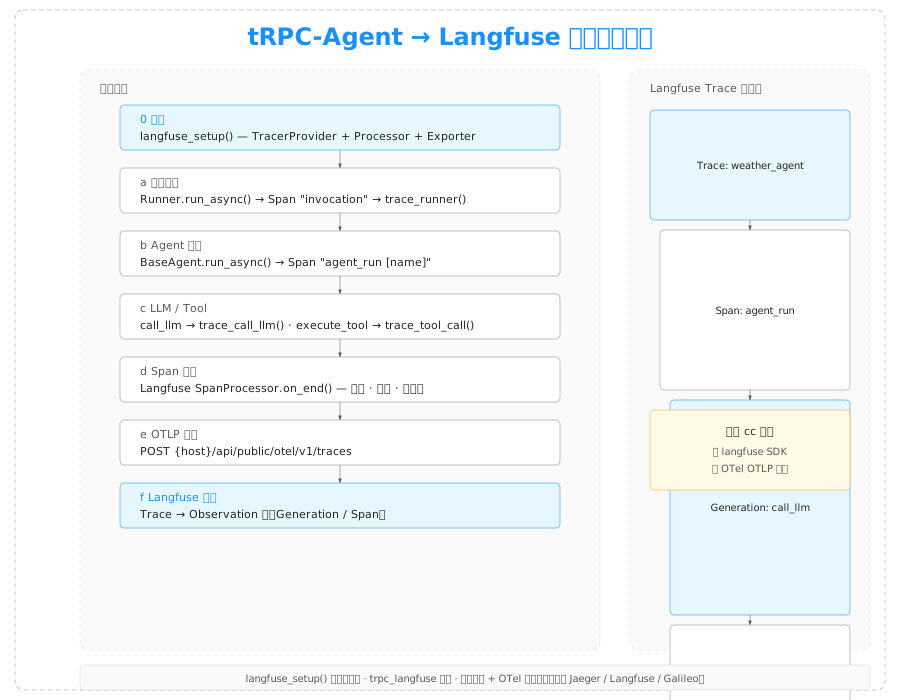
┌──────────────────────────────────────────────────────────────────┐
│ 1. 启动:langfuse_setup(LangfuseConfig(...))                      │
│    注册 TracerProvider + Langfuse SpanProcessor + OTLP Exporter   │
└────────────────────────────┬─────────────────────────────────────┘
                             ▼
┌──────────────────────────────────────────────────────────────────┐
│ 2. 用户调用:Runner.run_async(user_id, session_id, message)       │
│    创建 Span "invocation",执行结束后调用 trace_runner() 写属性    │
└────────────────────────────┬─────────────────────────────────────┘
                             ▼
┌──────────────────────────────────────────────────────────────────┐
│ 3. Agent 执行:BaseAgent.run_async()                              │
│    Span "agent_run [name]" → trace_agent()                        │
└────────────────────────────┬─────────────────────────────────────┘
                             ▼
┌──────────────────────────────────────────────────────────────────┐
│ 4. LLM / Tool 子 Span                                             │
│    call_llm → trace_call_llm()                                    │
│    execute_tool {name} → trace_tool_call()                        │
└────────────────────────────┬─────────────────────────────────────┘
                             ▼
┌──────────────────────────────────────────────────────────────────┐
│ 5. Span 结束:Langfuse SpanProcessor.on_end()                     │
│    过滤无关 Span → 属性映射 → 重命名 Span                         │
└────────────────────────────┬─────────────────────────────────────┘
                             ▼
┌──────────────────────────────────────────────────────────────────┐
│ 6. OTLP 导出:POST {host}/api/public/otel/v1/traces               │
│    Authorization: Basic base64(public_key:secret_key)             │
└────────────────────────────┬─────────────────────────────────────┘
                             ▼
┌──────────────────────────────────────────────────────────────────┐
│ 7. Langfuse 平台:Trace → Observation 树(Generation / Span)       │
└──────────────────────────────────────────────────────────────────┘4. Langfuse 中的典型 Trace 结构
一次 Runner 调用在 Langfuse 中的逻辑结构:
Trace: "[trpc-agent]: my_app/weather_agent"
├── Span: "agent_run [weather_agent]"
│   ├── Generation: "call_llm"          # LLM 调用
│   ├── Span: "execute_tool get_weather"  # Tool 调用
│   └── Generation: "call_llm"          # 拿到工具结果后的 LLM 调用
└── (trace 级 input/output 来自 runner 属性)生活类比:一张外卖订单(Trace)= 顾客下单(runner input)→ 主厨做菜(agent span)→ 多次「问冷库」(LLM)和「取食材」(Tool)→ 最终出餐(runner output)。
5. 两种接入入口
| 方式 | 适用场景 | 入口 |
|---|---|---|
| langfuse 扩展 | 独立 Python 脚本 / FastAPI | 代码里调用 langfuse_setup() |
| trpc_langfuse 插件 | tRPC-Python 微服务部署 | trpc_python.yaml + import trpc_agent_ecosystem.trpc_langfuse |
两种方式最终都调用同一个 langfuse_setup(),只是配置来源不同。
6. 依赖关系
安装 trpc-agent[langfuse] 会引入:
opentelemetry-sdkopentelemetry-exporter-otlp-proto-http
不依赖 langfuse Python SDK。上报走 OTel OTLP 协议,Langfuse 服务端负责解析。
7. 与 cc_to_langfuse 方案的本质区别
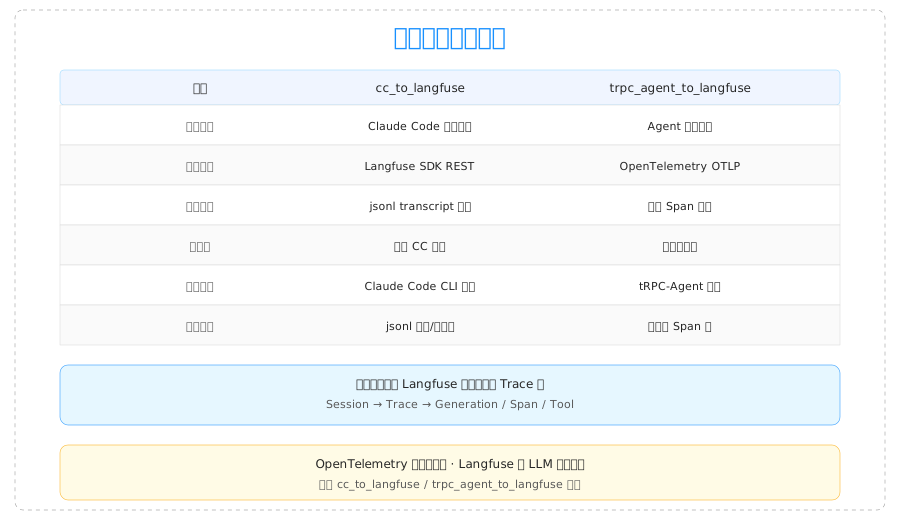
| cc_to_langfuse | trpc_agent_to_langfuse | |
|---|---|---|
| 集成点 | Claude Code 外部旁路 | Agent 框架内部 |
| 协议 | Langfuse SDK REST | OpenTelemetry OTLP |
| 数据完整性 | 依赖 jsonl 写入是否完整 | 依赖框架埋点覆盖范围 |
| 适用产品 | Claude Code CLI | tRPC-Agent 应用 |
两者最终都在 Langfuse 平台呈现 Trace 树,但采集路径完全不同。